Key Takeaways
- A below-market ROAS often points to a listing problem, not a campaign problem — and Campaign Manager will never tell you that.
- Amazon’s Search Query Performance report runs a three-stage funnel diagnostic that pinpoints exactly where buyers are dropping off.
- Each funnel stage maps to a different fix: stage one is a creative problem, stage two is a listing content problem, stage three is a trust or pricing problem.
- Segmenting by query type — especially size-specific or variant-specific queries — reveals high-intent buyers leaving at near-zero conversion rates.
- Fixing the listing before scaling ad spend is the correct sequence: get organic conversion rate above 10 to 15% first.
General Summary
When ROAS drops, most sellers open Campaign Manager. They adjust bids, tighten match types, and review budgets — and the number stays flat. The real problem is often the listing itself. Amazon’s Search Query Performance report, found inside Brand Analytics, runs a three-stage funnel breakdown on your top ASINs. It compares your click rate, add-to-cart rate, and purchase rate against the market benchmark for your category. A $6,600 spend with zero orders traced to a stage-two listing failure — not a bidding error. As AI-driven advertising becomes the default on Amazon, understanding where buyers drop out of your funnel matters more than ever. Sellers who can read the SQP report and act on it have a structural advantage over those chasing ROAS through bid adjustments alone.
Extractive Summary
When ROAS falls, the instinct is to look at campaigns — but the root cause is often the listing. Amazon’s Search Query Performance report provides a three-stage funnel breakdown that identifies exactly where buyers drop off. Click rate measures whether the creative is working before the click. Add-to-cart rate reveals whether the listing is closing the consideration phase. Purchase rate exposes pricing, trust, and delivery friction after the buyer has already committed enough to cart. Fixing the specific stage where your funnel breaks — not all stages simultaneously — produces the fastest lift. Organic conversion rate above 10 to 15% is the threshold to hit before scaling ad spend.
Abstractive Summary
Amazon advertising has a structural blind spot: Campaign Manager measures campaign performance, not listing performance. A listing that fails to convert sends identical signals across every campaign simultaneously — which looks like a campaign-wide problem and is almost never diagnosed correctly. The Search Query Performance report closes this blind spot. It connects pre-click behaviour to post-click behaviour in a single view, something no campaign dashboard does. Sellers who treat their listing as a conversion asset — as important as the ad itself — consistently outperform those who treat the listing as a background assumption. The diagnostic habit is the advantage.
Why Does Your ROAS Look Like a Campaign Problem When the Listing Is the Cause?
Your ROAS is down because every campaign is routing traffic to a listing that fails to convert — and Campaign Manager has no way to show you that. When a listing underperforms, it drags every campaign simultaneously. There is no single campaign that looks broken. The signal is diffuse, which is why sellers reach for bids instead of listing copy.
One account we audited last month had spent $6,600 over 65 days with zero orders. The keywords were right. The bids were competitive. The budgets were healthy. The listing was the problem — and nothing in Campaign Manager flagged it.
This pattern shows up constantly in audits. ROAS looks like a PPC problem. It diagnoses as a listing problem. It never gets fixed because the seller keeps pulling the wrong lever.
There is a free report inside Brand Analytics that runs a three-stage funnel breakdown on your top ASINs. It takes about 20 minutes. It tells you almost immediately whether you’re dealing with a campaign problem or a listing problem. Most sellers have never opened it.
What Is the Search Query Performance Report and Where Do You Find It?
Search Query Performance is a report inside Brand Analytics that shows how your ASINs perform across three stages of the buyer journey for each search term. You find it in Seller Central under the Brand Analytics tab. Filter by your top ASINs and pull the last 30 to 60 days of data.
The report shows three columns for each search term: click rate, add-to-cart rate, and purchase rate. Next to each metric, it displays the market benchmark for your category. That three-column comparison is the entire diagnostic.
Each stage points to a completely different problem:
- Click rate is stage one. A below-market click rate is a pre-click problem — your main image or title is not matching what buyers expect to see in search results.
- Add-to-cart rate is stage two. The traffic is arriving. The listing is not closing the consideration phase.
- Purchase rate is stage three. Someone committed enough to cart the product and did not buy. That is usually a pricing problem, a review confidence problem, or a delivery expectation problem.
None of these get fixed by adjusting bids. That is the part most accounts get wrong.
What Did the Three-Stage Funnel Reveal in a Real Account?
In the account with $6,600 in spend and zero orders, stage one numbers were almost identical to market. Click rate came in at 1.64% against a market average of 1.62%. The main image and title were doing their job — buyers were finding the product and clicking at exactly the rate competitors were getting.
Stage two is where it fell apart.
Add-to-cart rate sat at 38.7% against a market average of 47.0%. An 8.3 percentage point gap. For every 100 people landing on this listing, approximately 8 were adding to cart who should have been — but were not.
Stage three trailed a further 5 percentage points behind market on top of that.
The funnel tells a specific story. The ads were bringing the right people. The click was happening. Something on the listing page was causing abandonment — consistently, at scale, across every campaign simultaneously. That is why ROAS looked like a PPC problem. Every campaign was suffering. No individual campaign was broken. The root cause was not in any campaign at all.
What Specific Listing Problems Were Causing the Stage-Two Drop-Off?
Four separate listing problems were causing the stage-two abandonment in this account.
The main image. The product’s natural colouring looked faded and ambiguous next to competitor listings. Buyers scanning search results have had their visual expectations set by every other image they have scrolled past. When yours does not match that visual standard, there is a moment of hesitation — and on Amazon, hesitation is abandonment. A single image change on a well-trafficked listing has moved conversion by 15 to 32% in documented A/B tests. It is the highest-leverage variable on the page and the one sellers change least often.
Size ambiguity. The SQP data showed something specific: generic category terms had acceptable conversion rates, but size-specific queries had near-zero purchase share. One size query showed 1.74% click share, 3.55% add-to-cart rate, and 0% purchase share. A buyer searched for a specific size, clicked, added to cart, and still did not buy. The listing was not clearly confirming which size was right for them.
Mobile title truncation. The size qualifier — the exact answer to the buyer’s key question — was buried too far along the title string to appear in the truncated mobile view. Keywords that sound impressive but do not answer a purchase question were consuming the visible title real estate. On mobile, where most Amazon browsing happens, the one piece of information the buyer needed was not visible at all.
Variant pricing confusion. The two size variants were priced too similarly. When buyers cannot perceive a clear value difference between sizes, both feel like uncertain purchases — and uncertain purchases on Amazon default to no purchase.
Four listing problems. One ROAS problem that looked like it belonged to the campaigns.
How Do You Run the Three-Stage Funnel Check on Your Own Account?
Go to Brand Analytics, then Search Query Performance. Filter by your top ASINs. Pull the last 30 to 60 days.
Run the three-stage check in order. Is your click rate within 0.2 to 0.3 percentage points of market? If yes, your creative is working — move to stage two. Is your add-to-cart rate below market? That is a listing content problem. Is your purchase rate below market even where add-to-cart is close? That is a pricing, review, or delivery problem.
Do not only look at overall performance. Segment by query type. Pull your size-specific or variant-specific queries separately. In many accounts, aggregate numbers look acceptable while specific high-intent queries sit at near-zero conversion. Those are your most valuable buyers — the ones who came in with a specific need — and they are the ones leaving.
Cross-reference with your placement data. Product page placements convert at a much lower rate than top-of-search placements. Your blended conversion rate can look acceptable while a specific placement type drags it down. If you are running broad or auto campaigns with significant product page placement share, that alone can make a healthy listing look like it is underperforming.
What Should You Fix First After Running the Diagnostic?
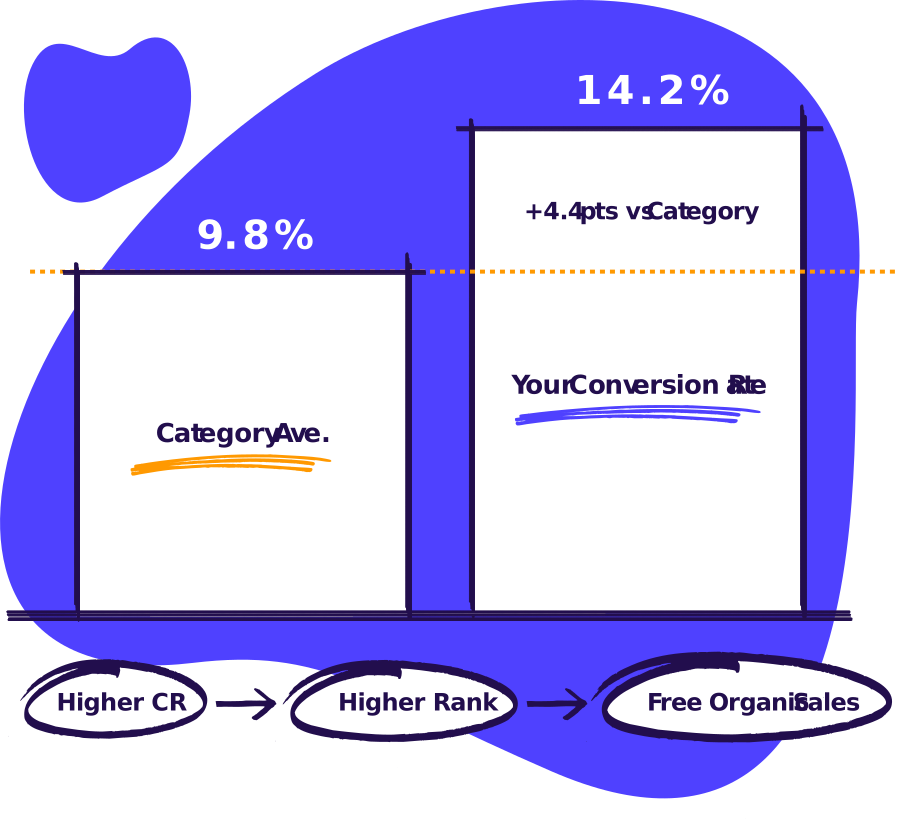
Get your organic conversion rate above 10 to 15% before scaling ad spend. Every dollar spent advertising a listing below that threshold is working against a structural deficit — you are paying to drive traffic to a page that is failing to close.
Use Amazon’s Manage Your Experiments tool to A/B test your main image and title. Get statistical confirmation before committing to a change. Fix the specific stage where your funnel breaks, not all stages simultaneously. Fixing the wrong stage wastes time and obscures which change actually moved the number.
Once listing changes are live and indexed, watch what happens to ROAS across every campaign — without touching a single bid.
When we walked through this data with the brand owner, his response was direct: every PPC dollar was currently working against a below-market conversion rate. As the listing improvements landed and indexed, ROAS lifted across the board without any campaign changes.
No new keywords. No bid restructures. No new campaign types. Just fixing what was on the page.
What Is the Correct Relationship Between Ads and Listings?
Your ads send people to the listing. The listing closes the sale. These are two separate jobs, and they require two separate diagnostic habits.
Campaign Manager measures campaign performance. It has no visibility into what happens after the click. Search Query Performance measures what happens after the click. It has no visibility into campaign structure. Running both reports together gives you a complete picture of where value is being lost.
Sellers who optimise the ads and ignore the listing are working on the wrong problem. The Search Query Performance report will show you that in about 20 minutes — and it will show you exactly which stage to fix first.