Key Takeaways
- Two Amazon reports can both be accurate and still disagree, because they answer different questions and count events under different rules.
- Amazon Ads reporting dates a purchase to the day of the ad click or view, while retail reports date it to the day of the order.
- Attribution windows, brand halo sales, tax, cancellations and the difference between purchases and units explain most gaps between ad and retail figures.
- Reconciling two reports means matching account, currency, dates, scope and data maturity first, then naming each remaining difference.
- The right number to trust is the one built for the decision in front of you, used the same way every month.
Amazon advertising reports disagree because each one answers a different question, dates events differently and applies its own rules for attribution, products, tax and cancellations, so reconciling them means matching those rules before comparing totals. On this page, reconciliation means lining up the Amazon Ads console and its exports with Seller Central or Vendor Central retail reports, the API, Amazon Attribution and Amazon Marketing Cloud (AMC). Matching your ad Cost to your invoices is a separate task, covered in the
Amazon ad spend report guide. The gaps matter because a team that cannot explain them stops trusting the reports and starts arguing about numbers instead of acting on them. The sections below explain where each report fits, why the figures differ, and the checklist Clear Ads uses to reconcile them.
Which report should answer which question?
Each Amazon report should answer the question it was built for: the Amazon Ads console for advertising decisions, retail reports for total sales, payments reports for money settled and AMC for customer journeys. Most reconciliation problems start when one report is asked to do another report’s job.
| Business question |
Main source |
Why |
| Which targets should get more or less budget? |
Amazon Ads reporting |
Holds ad-attributed traffic, cost and purchases |
| How much did the business sell in total? |
Seller Central Business Reports or Vendor Central Retail Analytics |
Includes paid, organic and every other source |
| What money actually settled? |
Payments and transaction reports |
Uses posted transactions, fees, refunds and settlement timing |
| What did a customer journey across several ads look like? |
Amazon Marketing Cloud |
Supports custom, aggregated analysis across eligible events |
| What did marketing outside Amazon drive? |
Amazon Attribution |
Measures eligible off-Amazon channels with its own attribution model |
A keyword report should never stand in for a finance ledger, and a settlement report should never be used to choose keywords.
Pick the source by the decision first, and most of the arguments about which number is right disappear.
Why do Amazon ads reports show different numbers?
Amazon ads reports show different numbers because they date events differently, use different attribution windows, mature at different speeds and count different things under similar names. The nine causes below explain most gaps between Amazon reports.
Traffic date versus order date
Unified reporting assigns a purchase to the date of the ad click or view, not the date the shopper completed the order. A click on Monday followed by a purchase on Friday adds to Monday’s reported sales. Retail reports such as Business Reports put the same order on Friday, so the two daily totals cannot match until both days are complete.
Attribution windows
Sponsored Products credits a purchase within 7 days of an ad click for sellers and within 14 days for vendors and authors. Amazon also says seller attribution can include other products sold by the same seller, while vendor attribution can include products from the same brand.
Amazon Attribution uses a 14-day window for eligible marketing outside Amazon, so its figures are not interchangeable with Sponsored Ads reporting. Since 1 January 2026, Sponsored Brands and Sponsored Display campaigns billed per viewable impression, and Amazon DSP ads in the Amazon store, credit views using what Amazon calls shopping-signal enhanced last-touch attribution, which uses a shorter window. The separate “all views” metrics, such as Purchases (all views), keep the 14-day view window.
Conversion maturity and restatement
Recent days are incomplete in every Amazon ads report. Purchases keep arriving until the attribution window closes, and because they are dated back to the ad interaction, a day that looked final can still change.
Traffic changes too. Amazon says impressions and clicks can be revised for up to three days while it removes invalid traffic, and purchase figures can be restated later and update earlier dates. Mark recent days as provisional and use the same delay before every month-end sign-off.
Cancelled, returned and declined orders
Amazon says its downloadable Sponsored Ads reports exclude cancelled purchases. Its attribution guidance adds that purchases cancelled, returned or declined within 72 hours of the order are deducted in later restatements, which can arrive days after the cancellation.
Returns outside those rules can be treated differently in advertising, retail and payments reports. That alone is enough to stop an ad report and a retail report from matching line by line.
Purchases, units and order items
A purchase is one attributed order event, while units sold counts the products inside those purchases, so one purchase can hold several units. Seller Central counts differently again: an order item is one product line in an order, and a session is one customer visit, with repeat views within 24 hours counted together.
Older report pages called purchases “orders”, and unified reporting standardises the name as Purchases. The conversion rate maths that follows from these definitions is set out in the
Amazon ads conversion rate guide.
Brand halo and promoted products
Total ad-attributed sales can include products other than the one in the ad. Amazon calls these halo sales and offers promoted-product versions of the sales and purchase metrics for questions about the advertised product alone.
Halo sales can make ad sales look high against an ASIN-level retail figure. Compare like with like: total attributed sales against the matching brand or seller scope, or promoted sales against the promoted ASIN.
Tax and discounts
Amazon’s attribution guidance says attributed sales have tax taken off in marketplaces where prices include VAT or GST, and that some cart-level discounts are not reflected. Ad sales can therefore sit below the price the shopper saw and below a gross retail report.
Report settings and API versions
Console tables, downloads and API pulls differ when they use different date ranges, time units, filters, campaign statuses, attribution columns or currencies. API versions also differ in which reports they offer and how fields are defined, and the newer unified reporting dates purchases by traffic date.
Record the account, marketplace, currency, date range, time grain, generation time, filters and metric names before comparing any two exports.
Amazon Marketing Cloud privacy rules
AMC returns aggregated, pseudonymised results rather than raw event rows. A result must meet minimum thresholds for unique users, so small groups can be suppressed or returned empty. AMC data also arrives later than console data, and every query sets its own logic, so an AMC total can differ from the console for reasons that have nothing to do with errors.
Name the cause before you change the number, because most gaps have a rule behind them.
How do you reconcile two Amazon reports?

You reconcile two Amazon reports by defining the question, matching both reports’ settings, letting the data mature, comparing raw figures, and naming every difference that remains. The 18 steps below are the Clear Ads reconciliation checklist, run in this order.
Define
- Write the question in one sentence.
- Name the metric and the source that answer it before opening a spreadsheet.
- Decide whether the analysis is about advertising, total retail sales, finance or customer journeys.
Normalise
- Match the advertiser account and the marketplace.
- Match the currency, and never mix GBP, EUR and USD without a stated conversion rate.
- Match the date range, time zone and time grain.
- Match the ad products and campaign statuses.
- Match the metric scope: total or promoted, click or view, purchases or units.
Mature
- Record when each report was generated.
- Leave out the most recent incomplete days, or label them provisional.
- Re-pull traffic after the validation period, and purchases after your chosen close window.
Reconcile
- Compare raw fields first: impressions, clicks, cost, purchases, units and sales.
- Recalculate click-through rate, cost per click, ACoS and ROAS from those raw fields.
- Put a number on each known bridge, such as halo sales, tax, cancellations and currency.
- Log the unexplained remainder rather than hiding it inside a percentage.
Act
- Use the source built for the decision.
- Record any campaign change separately from the reconciliation.
- Keep the original exports and a short note of definitions, so anyone can repeat the result.
A reconciliation is finished when every material difference has a named cause or a named owner.
What does a reconciliation look like in practice?
A reconciliation in practice tests each known bridge between two totals before calling any gap an error. In this example, the Amazon Ads console shows $42,000 (USD) of attributed sales for a month, and a Seller Central ASIN report shows $38,000 (USD) of ordered product sales for the promoted products. The figures are teaching figures, not account data.
The $4,000 gap is not yet an error. Test these bridges first:
| Bridge to test |
Why it can move the gap |
| Brand halo |
The $42,000 may include halo products, while the $38,000 covers promoted ASINs only |
| Tax |
Ad sales may exclude VAT, while the retail figure includes it |
| Marketplace and currency |
Both reports must cover the same marketplace in the same currency |
| Dating |
Ad sales are dated to the click; retail sales are dated to the order |
| Cancellations and returns |
Either report may have been generated before later cancellations were processed |
| Product scope |
The retail report may show parent, child, SKU or ASIN level |
Once each bridge has a number, what remains is the real difference to investigate. A large remainder usually points to a filter or scope mistake, so check those before raising it with Amazon.
Which number should you trust for each decision?
Trust the number built for the decision, and keep using the same source for that decision every month.
- Bids, targeting and ad budgets: Amazon Ads reporting.
- Total sales and TACoS: your chosen Seller Central or Vendor Central retail source, named in the report.
- Invoices and accounting: settlement and transaction records.
- Custom journey analysis: AMC, with the query logic and privacy rules written down.
Switching sources whenever one gives a better-looking answer is what destroys trust in reporting. A fixed source per decision, with its rules documented, is what rebuilds it.
Frequently asked questions
Can ad sales be higher than total sales for one day?
Yes. Ad sales shown for a date can include purchases made later but credited back to clicks or views on that date, and halo sales can widen the gap further. Compare complete weeks or months, not single recent days.
Why does a third-party tool show a different TACoS from my own report?
TACoS depends on two inputs, ad cost and total sales, and each can be pulled differently. API timing, data maturity, currency, marketplace, tax treatment and the choice of total-sales field can all change the result, so check which sources the tool uses before comparing.
Should legacy and unified reports match exactly?
Not always. Unified reporting standardises metric names and dates purchases by traffic date, so compare a completed period with matching metrics before assuming that similarly named fields are identical. The changes are explained in the guide to
Amazon Ads unified reporting.
Why don’t ad clicks match sessions in Business Reports?
They count different things. A click is one ad click, while a session is one customer visit from any source, with repeat views within 24 hours counted together, so one shopper can create several clicks and only one session.
How long should you wait before treating a month as final?
Wait until the longest attribution window in the report has closed and the traffic validation period has passed. For reports that include 14-day windows, that means at least 14 days after month end, and a few more days give late restatements time to arrive.
What does this page not cover?
This page covers why Amazon reports disagree and how to reconcile them, and leaves four related topics to other pages:
What is the next step?
Pick the one gap your team argues about most, often ad sales against Seller Central sales, and run the checklist on a single completed month. Write down each bridge and its value, and agree which source owns each decision from now on. The
Amazon advertising reports hub shows how each report fits into that picture.
If reconciling the numbers takes more time than acting on them,
Clear Ads Amazon PPC management builds reporting with named sources and rules, so the weekly conversation is about decisions rather than about whose number is right.

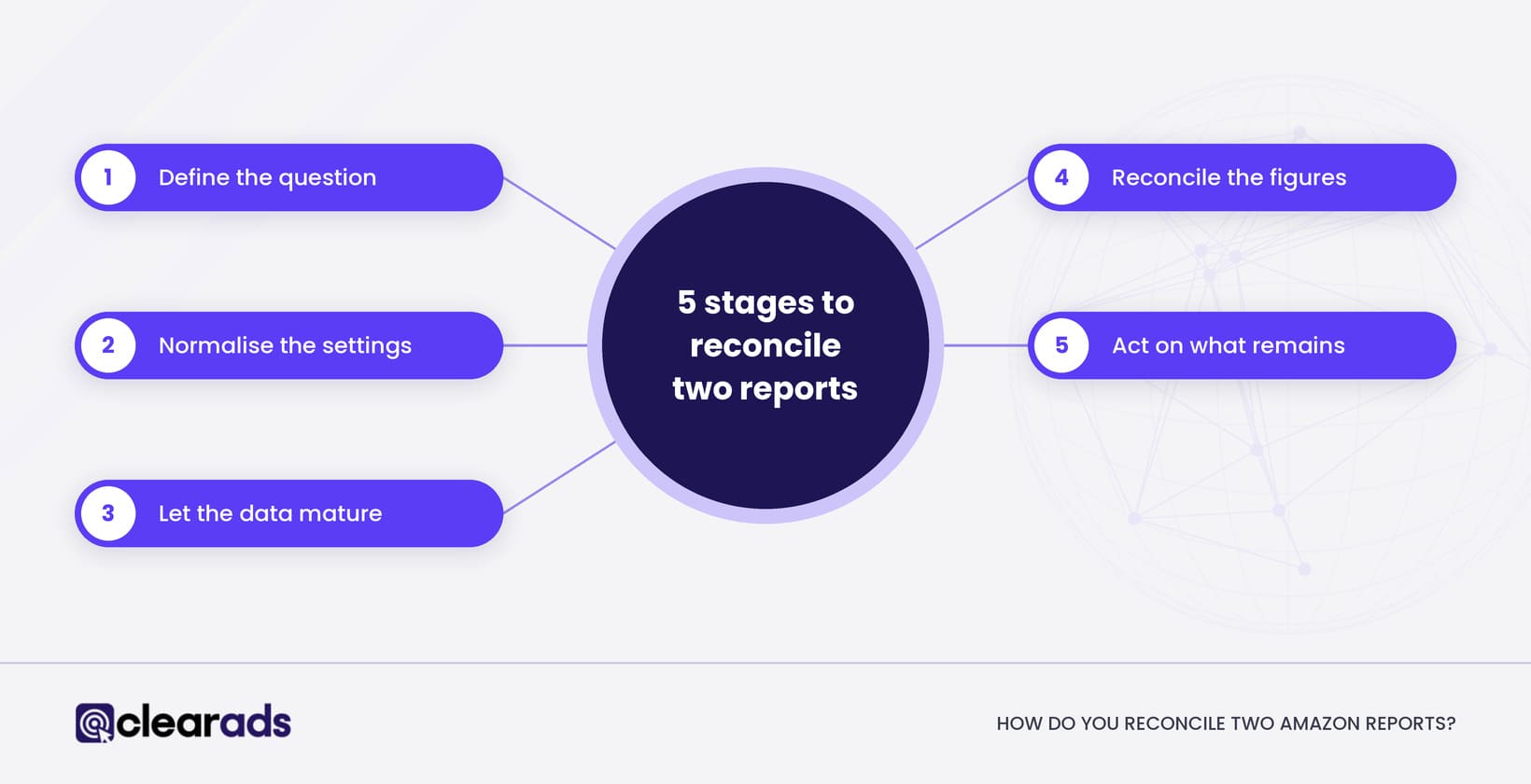 You reconcile two Amazon reports by defining the question, matching both reports’ settings, letting the data mature, comparing raw figures, and naming every difference that remains. The 18 steps below are the Clear Ads reconciliation checklist, run in this order.
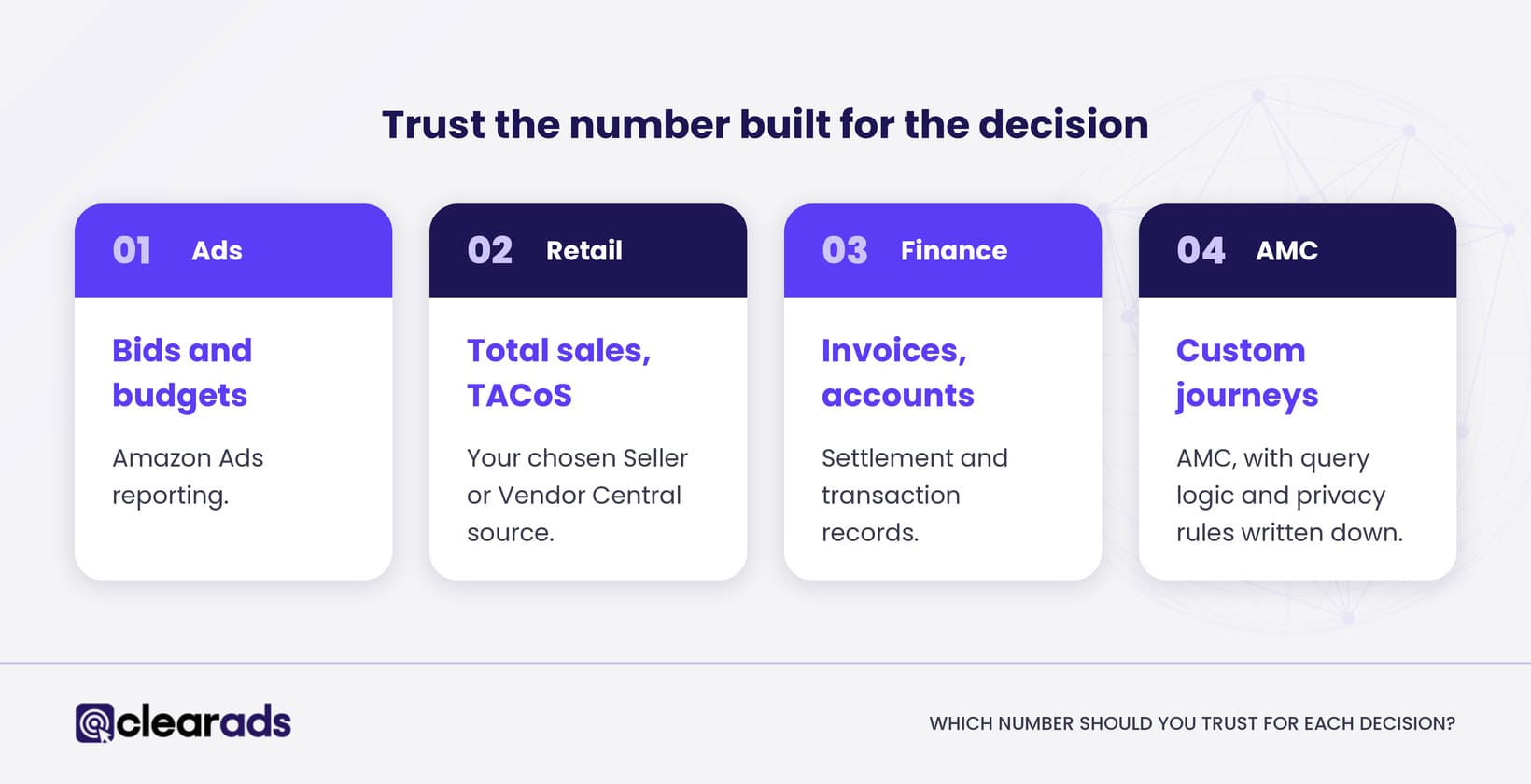 Trust the number built for the decision, and keep using the same source for that decision every month.