Key Takeaways
- Amazon advertising conversion rate equals ad-attributed orders divided by clicks, multiplied by 100.
- Unit Session Percentage is a separate Business Reports metric that divides units ordered by sessions, so it can pass 100% when one session buys several units.
- Total orders divided by total clicks gives the correct campaign rate; averaging each row’s percentage does not.
- An Amazon conversion rate only means something next to its report, its attribution window, and the exact period it was pulled for.
- Formats that can credit viewed ads, such as Sponsored Brands, Sponsored Display, streaming TV ads and Amazon DSP, count some orders without a click, so orders over clicks does not describe them cleanly.
- Comparing the direction of the advertising conversion rate with the direction of Unit Session Percentage shows whether a fall starts in targeting or on the listing.
Amazon advertising conversion rate is ad-attributed orders divided by clicks, multiplied by 100, while Unit Session Percentage, the listing-level measure in Seller Central, divides units ordered by sessions. This page covers conversion rate as Amazon measures it in Sponsored Ads and Business Reports, not the generic website conversion rate used on other channels. The distinction matters because the two figures answer different questions and rarely match, and Amazon’s 2026 move to unified reporting has changed how conversions are dated. The sections below give each formula, a worked calculation, the factors that move the number, and how to read it without drawing the wrong conclusion.
What is the formula for Amazon Ads conversion rate?
Amazon advertising conversion rate is ad-attributed orders divided by clicks, multiplied by 100. Conversion rate on Amazon always needs a stated opportunity, either an ad click or a product detail page session, and those two opportunities give two formulas that do not interchange.
In the advertising formula, the numerator counts orders, so a shopper who buys three units in one order adds one to the count. The denominator is ad clicks, which Amazon reports with invalid traffic removed.
Unit Session Percentage is a different measure: a listing metric from Business Reports, not an advertising metric. It divides units ordered by product detail page sessions, multiplied by 100. Amazon’s Seller Central glossary (UK) defines a session as one customer visit, with repeat views inside 24 hours counted together, so one session can hold several page views.
Business Reports are available to sellers in Seller Central; vendors see traffic and conversion data in Vendor Central reports instead. On this page a conversion means a purchase, and the report field decides the exact numerator and denominator.
| Measure | Numerator | Denominator | Where to find it | Unit | Can it exceed 100%? |
| Advertising conversion rate (Sponsored Products) | Ad-attributed orders | Clicks | Sponsored Products targeting and search term reports | % | No |
| Unit Session Percentage | Units ordered | Sessions | Business Reports (Seller Central) | % | Yes |
| Sponsored Brands purchase rate (clicks only) | Purchases attributed to ad clicks | Clicks | Sponsored Brands campaign reports | % | No |
Business Reports also shows Order Item Session Percentage in the Sales and Traffic by Date view: total order items divided by sessions, multiplied by 100. An order item is one product line in an order, so three units of the same product in one order count as one order item and three units. That makes it the closer match to the advertising rate, which also counts orders. It covers the whole account; for one ASIN, divide Total Order Items by Sessions in the by-ASIN view.
Two Amazon reports give two formulas: orders over clicks in advertising, and units over sessions in Business Reports.
How do you calculate Amazon Ads conversion rate?
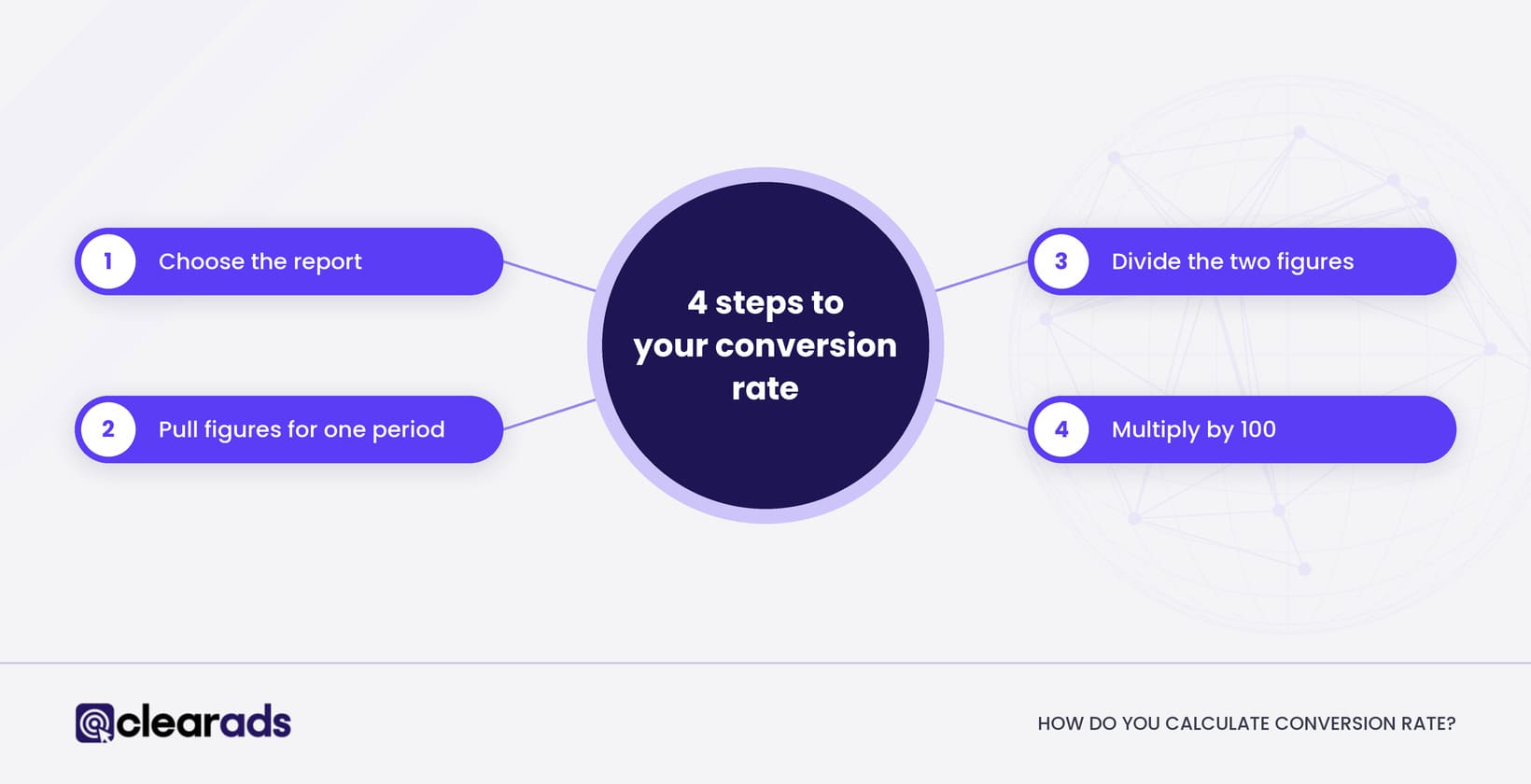
To calculate Amazon Ads conversion rate, divide ad-attributed orders by clicks for one matched period and multiply by 100. The same four steps give Unit Session Percentage when you swap in units ordered and sessions.
You need two inputs from the same report and period: ad-attributed orders and clicks for the advertising rate, or units ordered and sessions for Unit Session Percentage. Both results are percentages.
- Choose the report and the question it answers. The advertising conversion rate shows how well ad clicks convert; Unit Session Percentage shows how well the listing converts visits.
- Pull both figures for the same marketplace, product, period, and time zone, so the numerator and denominator line up.
- Divide ad-attributed orders by clicks for advertising, or units ordered by sessions for Business Reports.
- Multiply by 100 to express the result as a percentage.
20 ad-attributed orders from 400 clicks is a 5% advertising conversion rate (20 ÷ 400 × 100). On the listing side, 25 units ordered from 500 sessions is a 5% Unit Session Percentage (25 ÷ 500 × 100). These are teaching figures, not benchmarks, and they carry no claim about typical performance.
When a campaign holds many rows, divide total orders by total clicks rather than averaging each row’s percentage, because a row average gives a small row the same weight as a large one. As an illustration, a keyword with 1 order from 2 clicks (50%) and a keyword with 10 orders from 398 clicks (2.51%) average to 26.3%, while the true campaign rate is 11 ÷ 400 × 100 = 2.75%.
The formula has two more limits. A row with zero clicks or zero sessions has no rate at all, so leave it blank rather than reporting 0%. A rate pulled before the attribution window closes is provisional, because late orders can still be added to the numerator.
Total orders over total clicks, from one report and one period, is the only campaign rate worth reporting.
How many clicks do you need before a conversion rate means anything?
A conversion rate needs enough clicks behind it that luck cannot explain it, and the number depends on the rate you expect. Clicks per order gives the first check: at a 10% conversion rate you expect one order every 10 clicks, so 10 clicks with no order tells you very little.
The chance that a keyword with a true conversion rate c gets n clicks and no order is (1 minus c) multiplied by itself n times. The table shows how many clicks it takes before a run of zero orders becomes unlikely.
| Expected conversion rate | Clicks per order | Clicks before zero orders has a 1 in 10 chance | Clicks before zero orders has a 1 in 20 chance |
| 5% | 20 | 45 | 59 |
| 10% | 10 | 22 | 29 |
| 15% | About 7 | 15 | 19 |
| 20% | 5 | 11 | 14 |
A keyword or ad group with fewer clicks than the table shows is still collecting evidence. Pausing it or adding it as a negative before then is how converting search terms get blocked.
What is a good conversion rate for Amazon ads?
A good conversion rate for Amazon ads is one that clears the rate your margin and click prices require. Benchmark studies published in 2026 by Amazon advertising software providers put the average conversion rate for Amazon ads at roughly 10% to 12%, and Sponsored Products averages vary widely by category, from under 7% to over 35%. An average across every category and price point says little about one product.
Category and price move conversion rate more than anything else. A $12 (USD) refill bought out of habit and a $300 (USD) appliance researched for a week will never share a rate, which is why the Amazon conversion rate by category guide shows how to judge your figure against your own category.
Amazon’s own benchmarks give a closer comparison. Since 18 May 2026, Amazon Ads benchmarks reporting has been generally available in marketplaces including the US and UK, and brand owners registered in Brand Registry, and their representatives, can compare click-through rate, cost per click and purchase rate (new to brand) with peer brands in their category. The benchmarked purchase rate counts new-to-brand purchases only, so it sits below an all-purchases conversion rate.
The most useful test is the conversion rate your own numbers require, which the target ACoS section works out.
What changes conversion rate in Amazon advertising?
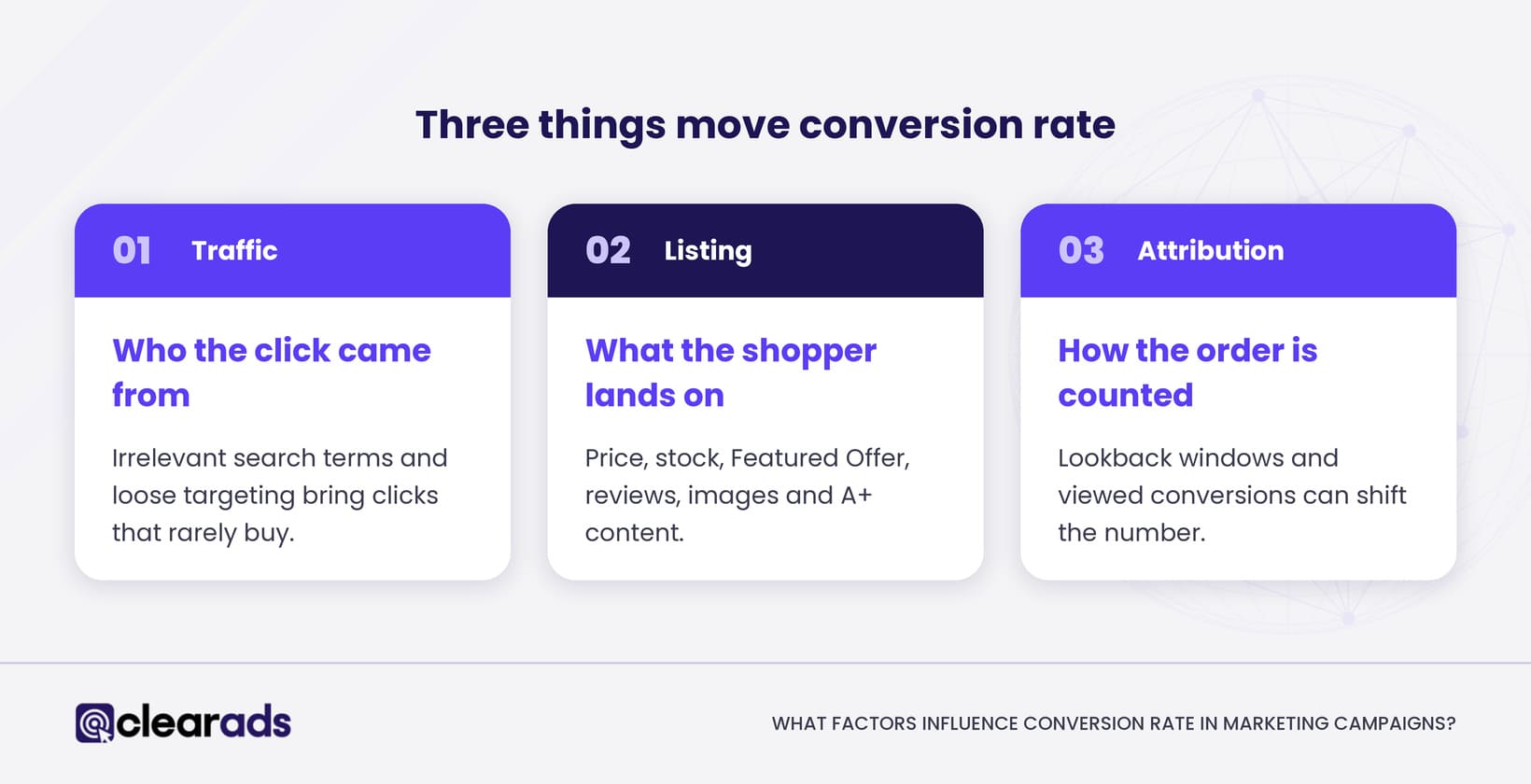
Amazon Ads conversion rate changes with three things: which shoppers click, what they land on, and how the order is attributed. Each one can shift the number without the product itself changing.
Traffic relevance comes first. Irrelevant search terms and loose product targeting bring clicks that rarely buy, which pulls the advertising conversion rate down even when the listing is strong. A high click-through rate from poorly matched search terms feeds weak clicks into the denominator. The Amazon PPC metrics guide shows how impressions and click-through rate feed into conversion rate.
The detail page comes second. Amazon’s 2026 guidance on optimising products for advertising names six listing levers: product information and images, price, stock availability, Featured Offer eligibility, reviews, and A+ content. Each one shapes whether a click becomes an order.
Attribution comes third, and it is easy to miss. As of Amazon’s 2026 attribution documentation, Sponsored Products uses a 7-day attribution window for sellers and a 14-day window for vendors. Amazon describes unified reporting as using traffic-based attribution, which ties a conversion to the day of the ad interaction, so recent conversion data stays incomplete until the window closes.
Format changes the picture again. Sponsored Brands, Sponsored Display, streaming TV ads (formerly Sponsored TV) and Amazon DSP can credit some purchases to ads that were viewed but not clicked, so a single orders-over-clicks rate does not describe them cleanly. Since 1 January 2026, Sponsored Brands and Sponsored Display campaigns billed per viewable impression, and Amazon DSP ads in the Amazon store, credit views using what Amazon calls shopping-signal enhanced last-touch attribution, which uses a shorter window, while separate all-views metrics such as Purchases (all views) keep the 14-day view window. Click-based attribution is unchanged, and Sponsored Products, billed per click, is unaffected.
How Clear Ads reads the two rates together
| Advertising conversion rate | Unit Session Percentage | Usual cause | Where to start |
| Low or falling | Steady | Targeting | The search term report |
| Low or falling | Low or falling | The listing (price, reviews, Featured Offer, stock) | The detail page |
| Steady | Falling | Non-ad traffic quality | Organic and external traffic sources |
Compare the direction of each rate, never one level against the other, because one counts orders and the other counts units. A fall in both points away from the campaigns, which saves weeks of bid changes that could never fix a listing problem.
Conversion rate and cost per purchase
Conversion rate sets how far ad spend stretches, because it links the cost of a click to the cost of an order. Cost per purchase equals cost per click divided by conversion rate, with conversion rate written as a decimal.
A cost per click of $1.00 (USD) at a 5% conversion rate gives a cost per purchase of $20.00 (USD): $1.00 ÷ 0.05. At the same click price, a 4% conversion rate raises the cost per purchase to $25.00 (USD).
A rising conversion rate on its own is no proof of more profit. It interacts with click price, product price, order volume, advertising cost of sales (ACoS), and return on ad spend (ROAS), the inverse of ACoS, both defined on the ACoS and TACoS page. Read conversion rate next to those figures, never alone.
What conversion rate do you need to hit your target ACoS?
The conversion rate you need equals your cost per click divided by your target ACoS multiplied by your average order value. Written out: required conversion rate = CPC ÷ (target ACoS × average order value), with the target ACoS as a decimal.
At a $1.20 (USD) cost per click, a 30% target ACoS and a $40 (USD) average order value, a keyword needs a 10% conversion rate: $1.20 ÷ (0.30 × $40) = 0.10. A keyword converting at 6% cannot reach a 30% ACoS at that click price.
The same relationship sets a bid ceiling: maximum cost per click = conversion rate × target ACoS × average order value. At 6%, that keyword can pay at most $0.72 (USD) per click to hold a 30% ACoS (0.06 × 0.30 × $40). These are teaching figures, not benchmarks. For how to set a target ACoS from margin and goals, use the ACoS and TACoS page, which owns the definition.
Why does conversion rate matter for Amazon advertisers?
Conversion rate matters to Amazon advertisers because it counts orders, so it shows which ads draw buyers rather than browsers. Clicks and impressions show interest; orders show the result the budget was paid to produce.
In Clear Ads-managed accounts, a low conversion rate on a single keyword is often the first sign of wasted spend, because a keyword can earn clicks all day and still sell nothing.
A keyword with a strong click-through rate and a weak conversion rate is the costliest pattern in a Sponsored Products account. It wins the auction, pays for the click, and sends a shopper who leaves without buying.
How is conversion rate different from click-through rate?
Click-through rate measures how often an ad is clicked when it is shown, and conversion rate measures how often a click becomes an order. Click-through rate is clicks divided by impressions; conversion rate is orders divided by clicks; both are multiplied by 100.
The two rates point at different fixes. A low click-through rate points at what the shopper sees in the results: the image, title, price and rating, and whether the search matches the product. A low conversion rate with a healthy click-through rate points past the ad, at the detail page or at clicks from searches that were never going to buy.
How do you measure conversion rate trends in Amazon reports?
Measure conversion rate trends by pulling the same report field over consistent periods and comparing like with like. A trend only holds if the attribution settings behind each data point match.
As of Amazon’s 2026 documentation, the advertising rate appears in the Sponsored Products targeting, search term, and advertised product reports, while Unit Session Percentage sits in Seller Central Business Reports at ASIN level. Break trends down by search term, placement (top of search, product pages), ASIN, ad type, and marketplace, and read each cut against a matched baseline.
Search-term-level conversion data starts in the Amazon Search Term Report, which lists the shopper searches that led to clicks. That report is the first place to look when a keyword earns clicks without orders.
Watch for false movement. A conversion rate that dips for the most recent days is often attribution lag, because unified reporting books conversions to the traffic date and fills them in during the attribution window. Amazon’s unified reporting documentation (UK, August 2026) states that legacy Sponsored Ads and Amazon DSP reports close by 31 December 2026, so check that window settings match on both sides of any trend that crosses the switch.
Where do you find conversion rate in Amazon Ads and Seller Central?
You find the advertising conversion rate in Campaign Manager and in Sponsored Ads reports, and Unit Session Percentage in Seller Central Business Reports. Each tool has its own route.
- Campaign Manager: open the Columns menu above the campaign table and add the conversion rate metric. The figure follows the console’s date range and the campaign’s attribution window.
- Sponsored Ads reports: the targeting, search term and advertised product reports carry the rate, or the orders and clicks to calculate it for any cut you need.
- Seller Central, for sellers: Reports, then Business Reports, then Detail Page Sales and Traffic by Child Item shows Unit Session Percentage for each ASIN. The Sales and Traffic by Date view adds Order Item Session Percentage for the whole account.
- Vendor Central, for vendors: Reports, then Retail Analytics, then Traffic shows glance views. Divide ordered units by glance views to get a conversion rate.
Pull each figure for the same marketplace and dates before you put two of them side by side.
How do you reconcile the numerator and the denominator?
Reconcile the numerator and the denominator by taking both from the same report and the same attribution rule. Mixing sources is the fastest way to a wrong number.
Never drop a view-inclusive order total into a clicks denominator. For Sponsored Brands and Sponsored Display campaigns billed per viewable impression, Amazon’s standard Purchases figure credits some ad views as well as clicks, so its numerator includes orders that had no click. Use click-attributed purchases when you divide by clicks, and label the numerator before you divide.
Amazon Marketing Cloud (AMC) can answer custom conversion questions for eligible advertisers, but only when the query declares its own event, denominator, and attribution rule. Any cross-campaign rate from AMC is therefore defined by the person who wrote the query, and that definition belongs next to the number wherever it is reported.
How do you optimise Amazon Ads conversion rate?
Optimise Amazon Ads conversion rate by fixing the detail page first, then tightening targeting, then testing one change at a time. Order matters, because a sharper listing raises the return on every targeting fix that follows.
Fix the detail page first, because the listing levers decide whether any click can become an order. Then use the search term report to add converting terms as keywords and to negate the terms that drain budget without selling.
Hold measurement discipline throughout: compare like for like, and wait for the attribution window to close before you judge a change. Before rolling a change across the account, A/B test your Amazon ad variations so a lift is measured rather than assumed.
Each lever is a possibility rather than a guaranteed gain. The result depends on the product, the category, and the traffic it draws.
Single-variable testing
Single-variable testing isolates one change, measures it against a matched baseline, and keeps only what holds up after the attribution window closes. That sequence turns a guess into evidence.
In practice, that means changing one image or one keyword target at a time, drawing the baseline from a comparable earlier period, and segmenting by search term and ASIN so a blended average does not hide a weak pocket. A change that looks good on day one but fades once the attribution window fills was never a gain.
Frequently asked questions
Does the Amazon ads conversion rate count orders for other products?
Yes, for Sponsored Products: the standard purchases figure includes orders for other products from the same advertiser, bought within the attribution window after the click, as well as orders for the advertised product. Reports that split purchases into the advertised product and other products let you calculate a conversion rate for the advertised product alone.
What does new-to-brand mean in Amazon ads?
New-to-brand describes a purchase from a shopper who had not bought from the brand on Amazon in the previous 12 months. Sponsored Brands, Sponsored Display and Amazon DSP report new-to-brand purchases, which is why a new-to-brand purchase rate, such as the one in Amazon’s benchmarks, sits below an all-purchases conversion rate.
Does conversion rate affect organic ranking on Amazon?
Amazon does not publish how its search ranks products, so no one can state an exact effect of conversion rate on organic rank. Ad-attributed orders are still sales of the product, and what is known about the link between ads and organic position is covered in how Amazon PPC affects organic rankings.
Can an Amazon ads conversion rate go above 100%?
Yes, in some cases. Sponsored Brands and Sponsored Display campaigns billed per viewable impression, and Amazon DSP, can credit purchases to ads that were seen but not clicked, so purchases can outnumber clicks. A rate above 100% usually means view-credited purchases are in the numerator, so divide click-attributed purchases by clicks instead.
Should you pause a keyword with a low conversion rate?
Only once it has enough clicks to judge and a lower bid has failed. Check its clicks against the table earlier on this page, then cut the bid to the ceiling your target ACoS allows, and pause the keyword if it still cannot reach the target at that bid.
What does this page not cover?
This page leaves three topics to other pages: conversion benchmarks by category, which the Amazon conversion rate by category guide covers; negative keyword and match type tactics, covered in Amazon PPC keyword match types and negatives; and DSP reach or AMC audience building, which sit on the Amazon DSP and Amazon Marketing Cloud hubs. It stays with the formula, the calculation, and how to read the result.
What is the next step?
Once you can calculate the advertising conversion rate and Unit Session Percentage, and read each against the right window, the next decision is whether to run the improvement in-house or bring in specialists. The Amazon advertising reports hub explains which other reports hold these fields.
If the account is large enough that a small conversion rate gain moves real money, a managed team can test and measure it faster than a stretched in-house rota. Clear Ads, an Amazon Ads Advanced Partner, covers that work through Clear Ads Amazon PPC management, from listing levers to attribution-clean measurement.