Amazon Review Requests: The New Paid Ad That Asks Buyers to Rate Your Product

Key Takeaways

  • Amazon Review Requests is a paid Amazon Ads ad that invites shoppers who recently bought your product to leave a star rating in one tap, on busy pages such as the Amazon homepage.
  • Amazon's launch page puts the US open beta in late October 2026, a separate Amazon news post says November 2026, and no other marketplace has a date yet.
  • Only products with fewer than 1,000 total ratings and reviews qualify, and campaigns pause automatically when a product reaches that threshold.
  • Amazon has not published a pricing model, so the fairest test of a campaign is the cost of each rating it adds above your normal weekly rate.
  • Review Requests works best after Vine and alongside the free Request a Review button, and it speeds up honest ratings in both directions.

Amazon Review Requests is a new Amazon Ads ad that invites shoppers who recently bought your product to rate it in one tap. This article covers the Amazon Ads product announced at Amazon's unBoxed 2026 event in September. The free Request a Review button in Seller Central has a similar name but is a separate tool. Reviews decide whether a new listing converts, yet many buyers never get round to leaving one. Below are the key facts, who qualifies, what it costs, how it compares with Vine and the button, and how to test it without wasting budget.

Review Requests at a glance

FactDetail
What it isA paid ad that invites recent buyers to rate or review your product in one tap
AnnouncedunBoxed 2026, with Amazon's announcements dated 29 September 2026
LaunchUS open beta from late October 2026; a separate Amazon news post says November 2026
MarketplacesUnited States only; other marketplaces are planned but have no dates
Who can use itRegistered sellers and vendors with an advertising account in good standing and no active policy violations
Product limitFewer than 1,000 total ratings and reviews; requests pause automatically at the threshold
Set-upAmazon Ads Agent, with the same bidding and budget controls as other Amazon Ads campaigns
PricingNot published by Amazon
Amazon's result claimAbout three times as many ratings and reviews per week in a US closed beta (3 to 21 June 2026)

What is Amazon Review Requests?
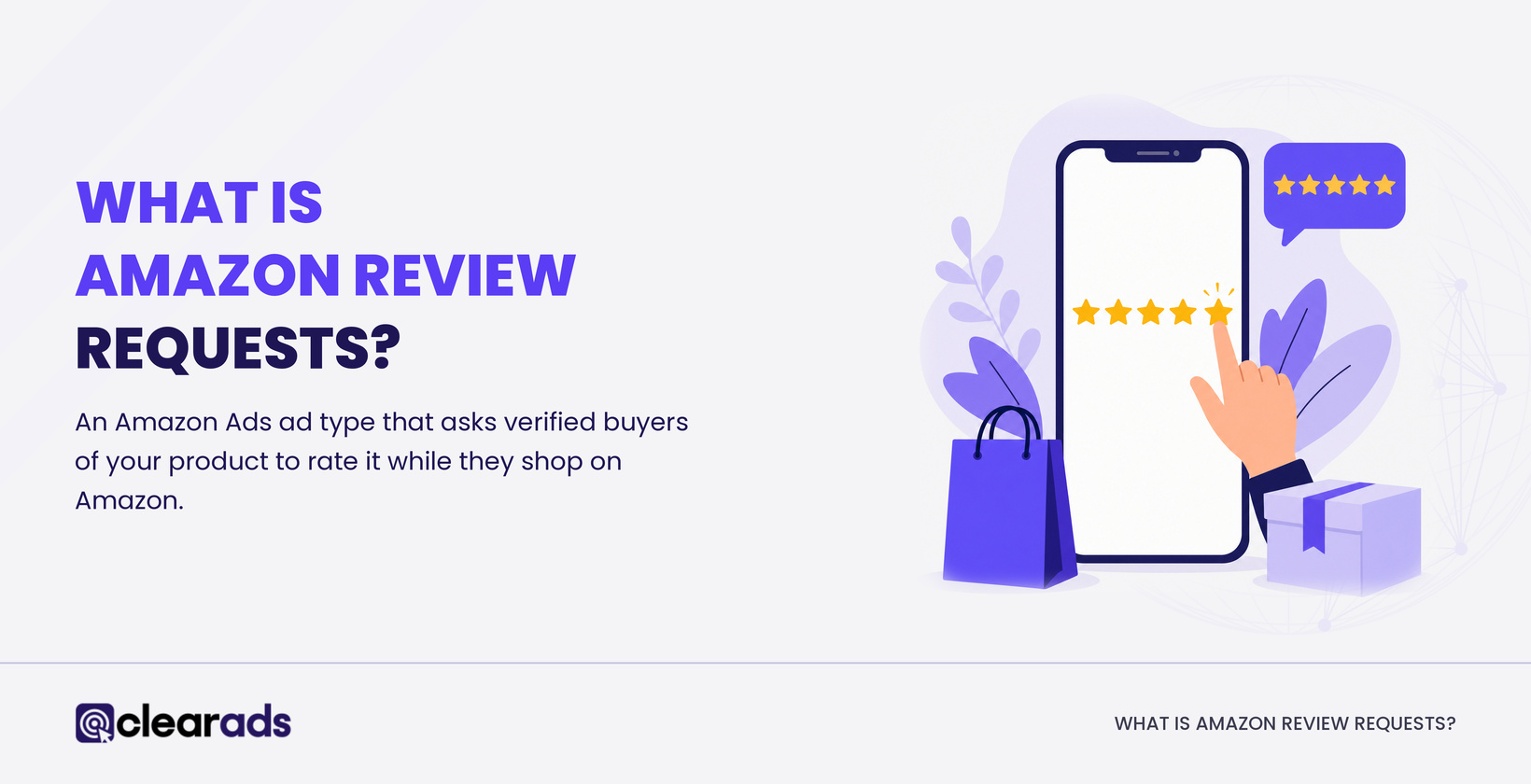
Hero image explaining what Amazon Review Requests is, an ad type that asks verified buyers to rate your product.

Amazon Review Requests is an Amazon Ads ad type that asks verified buyers of your product to rate it while they shop on Amazon. The ad runs on Amazon’s highest-traffic pages, and Amazon names the homepage as one of them.

A Review Requests ad works in three steps:

  • A shopper who recently bought your product sees the ad.
  • The shopper submits a star rating with one tap.
  • The shopper can add an optional written review with images or video.

Amazon describes the result as the same authentic reviews customers already leave, collected faster. Ratings sit on the product detail page, so every later visitor sees them, including shoppers who never saw the ad. For a new product, ratings gathered in the first weeks keep working on every visit after that.

When and where does Review Requests launch?

Review Requests opens as an open beta in the United States in late October 2026, according to Amazon's Review Requests launch announcement. A separate Amazon news post from the same day says Review Requests will launch in November 2026, without mentioning a beta or a marketplace. The safest reading is a US beta from late October, with wider availability from November.

Amazon ran a closed beta in the US from 3 to 21 June 2026, before the announcement. For every other marketplace, Amazon says only that more marketplaces and Amazon properties are planned for future releases. Sellers and vendors in the UK, Europe, Canada, Japan and elsewhere have no date yet.

Until Amazon names a date for your marketplace, Review Requests is a US-only tool.

Which products and accounts qualify for Review Requests?

Review Requests is open to registered sellers and vendors whose advertising account is in good standing with no active policy violations. A product qualifies when it has fewer than 1,000 total ratings and reviews, so a product with exactly 1,000 does not.

Amazon checks eligibility when you create the campaign and keeps checking while it runs. Requests for a product pause automatically once it reaches the threshold, so a product sitting at 950 ratings gives a campaign very little room.

Review Requests also needs buyers. The ad goes only to customers who recently purchased the product, so it cannot help before launch day, and Amazon has not said how recent a purchase must be.

Variation families need a closer look. Amazon has not said whether the 1,000 limit counts each child ASIN, the parent or the whole family. After Amazon's review split across variation families, a child ASIN can show far fewer ratings than its family total, so check the count on each child's detail page before you plan a test.

The best candidates sit well under 1,000 ratings and already sell steadily.

How much does Review Requests cost?

Amazon has not published a price for Review Requests. Campaigns are created and managed in Amazon Ads Agent with the same bidding and budget controls as other Amazon Ads campaigns, so you decide what you are willing to spend. Amazon has not said what event triggers a charge, and it has published no minimum bid or cost benchmark.

Early third-party reports disagree on billing. Some say advertisers pay per click, others that they pay only when a shopper submits a rating, and neither claim comes from Amazon. Plan a test budget without assuming either.

The measure that matters is the cost of each extra rating. Work it out in three steps:

  • Record how many new ratings and reviews the product earns in a normal week, including those from the Request a Review button.
  • Run Review Requests with a capped budget and record the new weekly total.
  • Divide the weekly spend by the difference between the two totals.

Take a product that normally earns 10 ratings a week and rises to 25 during a test spending $300 a week. That is 15 extra ratings, or $20 for each one. These are illustrative US figures, not Amazon benchmarks, and whether $20 is good value depends on how much the extra ratings lift that listing's conversion rate.

Judge Review Requests by cost per incremental rating, because a raw rating count includes ratings the product would have earned anyway.

How does Review Requests compare with Vine and the Request a Review button?
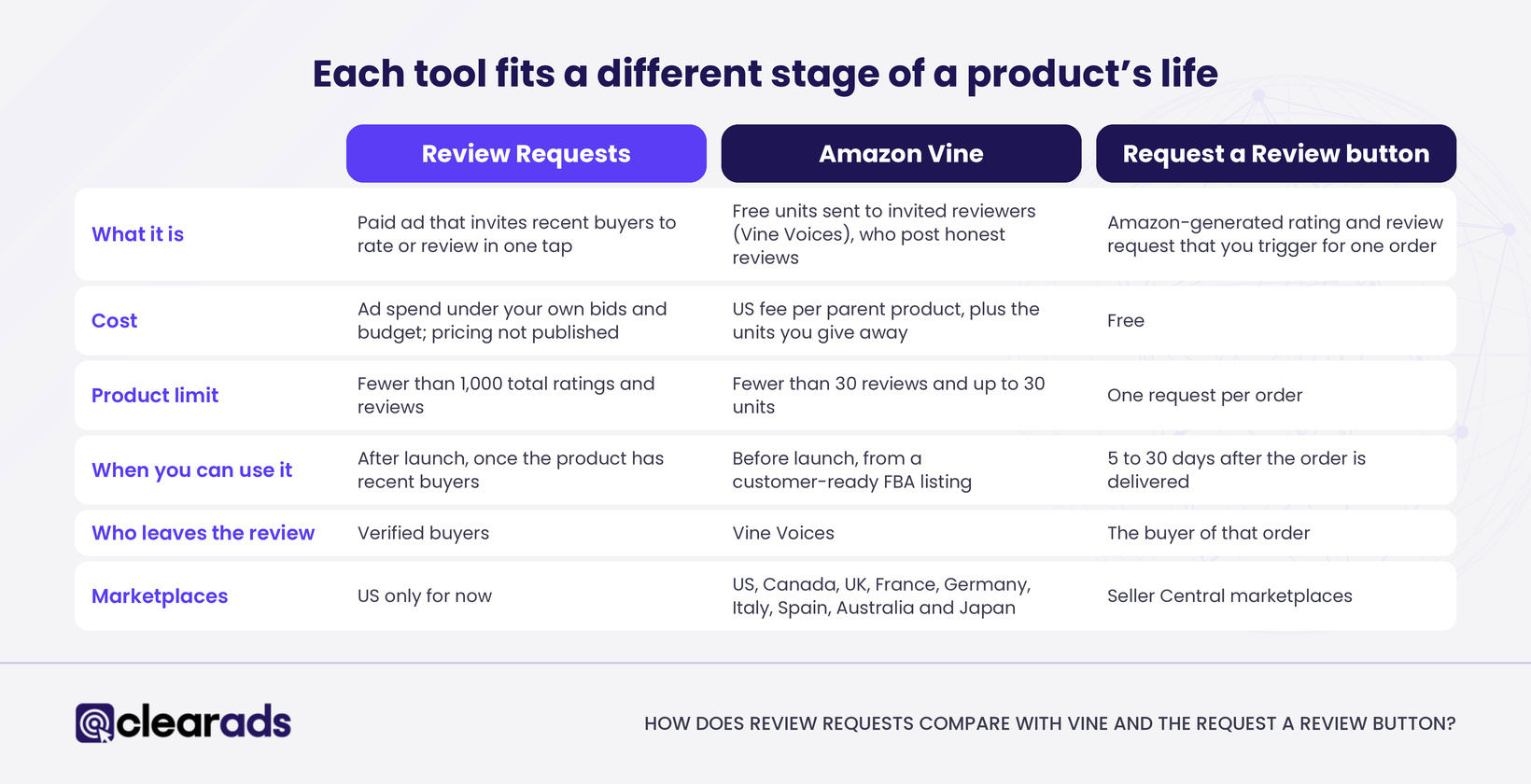
Infographic comparing Review Requests, Amazon Vine and the Request a Review button by cost, limits, timing and marketplaces.

Review Requests reaches recent buyers through a paid ad, Vine sends free units to invited reviewers, and the Request a Review button sends a free Amazon message for a single order. Each tool fits a different stage of a product's life, so the strongest plan uses them in sequence.

FeatureReview RequestsAmazon VineRequest a Review button
What it isPaid ad that invites recent buyers to rate or review in one tapFree units sent to invited reviewers (Vine Voices), who post honest reviewsAmazon-generated rating and review request that you trigger for one order
CostAd spend under your own bids and budget; pricing not publishedUS fee per parent product: free for up to 2 units, $75 for 3 to 10 units, $200 for 11 to 30 units, plus the units you give awayFree
Who can use itRegistered sellers and vendors with an advertising account in good standingSellers need a Professional account, a Brand Registry role (or generic products) and FBA offersSellers, from the order page in Seller Central
Product limitFewer than 1,000 total ratings and reviewsFewer than 30 reviews and up to 30 units; adult, digital and bundled products excludedOne request per order
When you can use itAfter launch, once the product has recent buyersBefore launch, from a customer-ready FBA listing5 to 30 days after the order is delivered
Who leaves the reviewVerified buyersVine VoicesThe buyer of that order
MarketplacesUS only for nowUS, Canada, UK, France, Germany, Italy, Spain, Australia and JapanSeller Central marketplaces

For a new product, the order that makes sense is Vine before launch, the button on every eligible order from day one, then Review Requests once there is a base of recent buyers. Amazon recommends having Vine inventory in its fulfilment network at least three weeks before the launch date, so reviewers have time to receive and try the product. The button costs nothing, so it should run regardless. Review Requests then adds a paid invitation on Amazon's busiest pages, which neither of the other tools offers.

Outside the US, Vine and the Request a Review button are the two tools available today.

How does Review Requests fit Amazon's review rules?

Review Requests fits Amazon's rules because Amazon itself runs the invitation and asks verified buyers for an honest rating. The seller pays Amazon for the ad placement, and nothing Amazon has published describes a payment or reward for the reviewer.

Paying for Review Requests does not relax the rules on everything else a brand does. Amazon's review policy still prohibits:

  • offering discounts, free products, refunds or other compensation in exchange for a review
  • asking buyers to change or remove a review they have already left
  • seeking reviews through third-party services, social media groups or sites that sell reviews
  • contacting customers outside Amazon's approved channels to ask for a review

Amazon can respond to review manipulation by removing all of a product's reviews, delisting the product permanently or withdrawing selling privileges. Treat Review Requests as one more approved channel, alongside Vine and the button, and keep every other review tactic inside the policy.

What are sellers and agencies saying about Review Requests?
Quote explaining why cost per incremental rating is the number worth tracking.

Early reaction on LinkedIn, X and Reddit splits into four views:

  • Speed: brands launching new products welcome a faster route to their first few hundred ratings, and some see it as a cleaner alternative to the grey-area review tactics the policy bans.
  • Cost: critics point out that the Request a Review button already asks buyers for free, so Review Requests charges for something sellers could already do, at a time when seller fees keep rising.
  • Quality: the ad pays for the ask, so a weak product collects its honest low ratings faster too.
  • Measurement: Amazon's three-times figure compares the same products before and during a closed beta that lasted under three weeks, and no control group has been published.

Several agencies have landed on the same conclusion: cost per incremental rating is the number worth tracking, because the free button already produces some of the ratings any campaign will claim.

How should brands prepare before testing Review Requests?
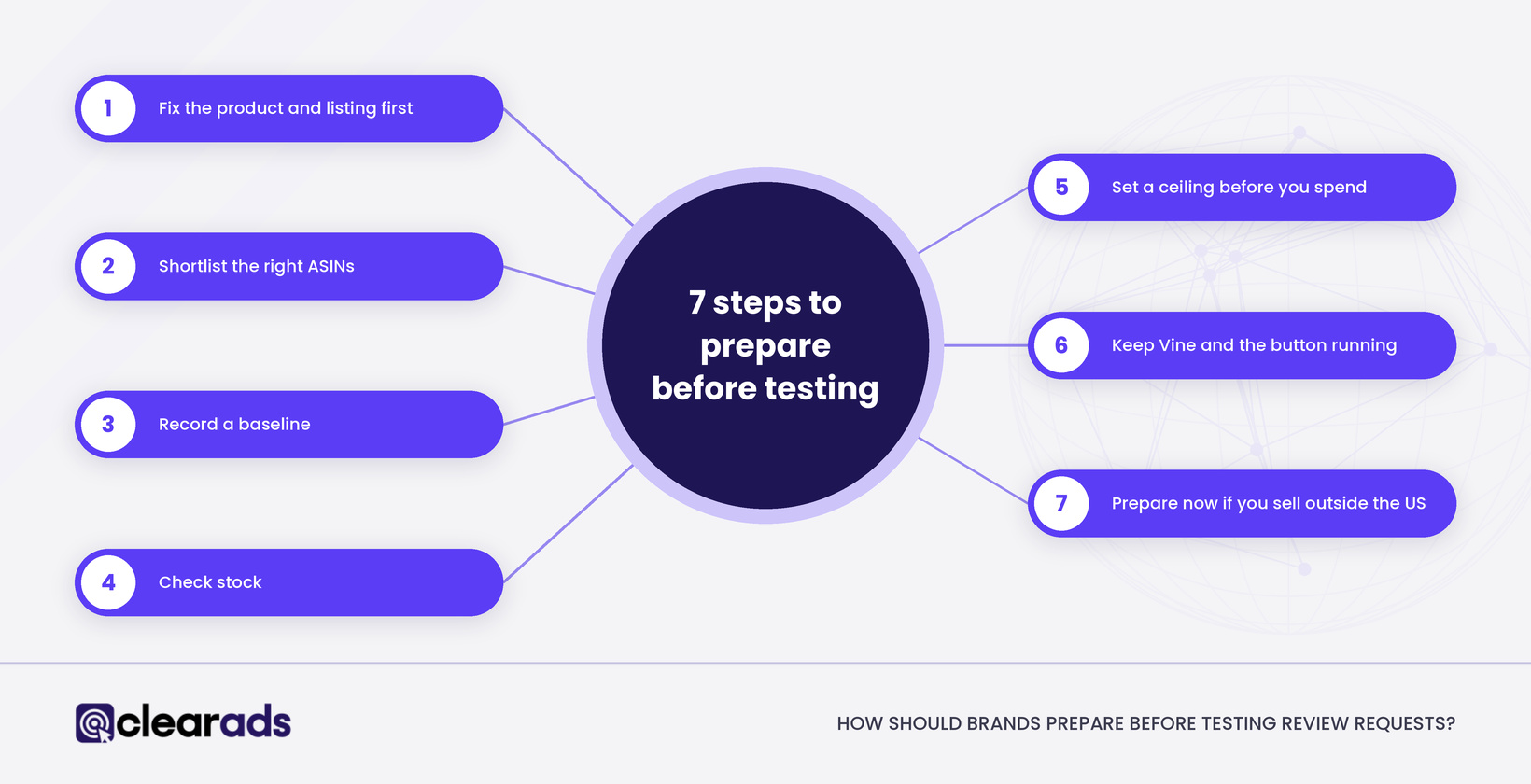
Infographic showing the 7 steps brands should take before testing Review Requests.

Brands should prepare the product, the shortlist and the measurement before the first campaign goes live. These steps are Clear Ads recommendations, not Amazon requirements.

  • Fix the product and listing first. Check return reasons, Voice of the Customer and recurring complaints in existing reviews, then correct the images, sizing and instructions behind "not as described" ratings. Review Requests speeds up honest feedback, good and bad.
  • Shortlist the right ASINs. Look for steady sales, fewer ratings than the products beside you in search, and a count comfortably below 1,000, because a product near the threshold pauses soon after the campaign starts.
  • Record a baseline. Log four to eight weeks of new ratings and reviews per ASIN, week by week, including those from the Request a Review button.
  • Check stock. A test that runs into a stock-out stops producing new buyers, so plan inventory for the full test window.
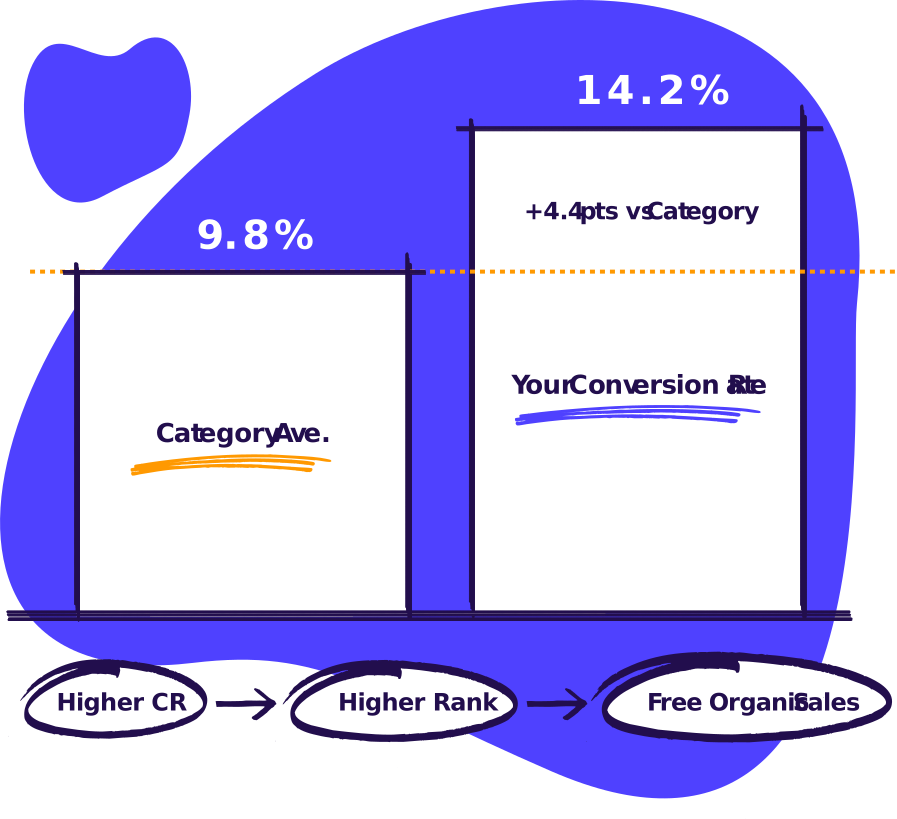
  • Set a ceiling before you spend. Decide the maximum cost per incremental rating you will accept, cap the budget, and judge the result on conversion rate as well as rating count. Use how your conversion rate compares with your category as the benchmark.
  • Keep Vine and the button running. Review Requests adds to both and replaces neither.
  • Prepare now if you sell outside the US. Build the baseline and the ASIN shortlist so you can start as soon as Amazon opens your marketplace.

What has Amazon not confirmed yet?

Amazon has left nine practical questions open, and each one affects how you plan a test:

  • the pricing model, the billing event and any minimum bid
  • how recent a purchase must be for a buyer to see the ad
  • whether the 1,000 limit counts per child ASIN, per parent or per variation family
  • whether Vine reviews count towards the 1,000
  • whether Brand Registry is required, and whether any categories are excluded
  • how often a buyer can see a request, and how it interacts with the Request a Review message
  • which reporting metrics campaigns will show
  • whether beta access is self-serve or arranged through an Amazon Ads account team
  • launch dates for marketplaces outside the US

We will update this article as Amazon publishes answers.

Frequently asked questions

Does a Review Requests ad guarantee a rating or review?

No. Each shopper decides whether to rate the product, and Amazon has not published an expected number of ratings per campaign or per dollar of spend.

Can I choose which buyers see a Review Requests ad?

Not with any setting Amazon has published so far. Amazon describes the audience only as verified buyers who recently purchased your product. Asking only satisfied customers for reviews would break Amazon's review policy in any case.

Can I set up Review Requests through the Amazon Ads API?

Yes. Amazon lists the Amazon Ads Unified API as an access point alongside Amazon Ads Agent, and Review Requests campaigns extend the existing Unified Campaign Management API endpoints. Amazon asks advertisers to contact their Amazon Ads account team for more detail.

Will Review Requests replace the free Request a Review button?

No. Amazon has announced no change to the Request a Review button or to Vine, and Review Requests is a separate paid option inside Amazon Ads. The button stays free, so it is worth using on every eligible order whether or not you run Review Requests.

How should Review Requests spend fit into ACoS and TACoS?

Count it in TACoS and judge it outside ACoS. TACoS measures all ad spend against total sales, so every Review Requests dollar belongs there, as the guide to how ACoS and TACoS are calculated explains. ACoS compares spend with ad-attributed sales, which a rating ad is not built to produce, so cost per incremental rating is the fairer test.

What does this article not cover?

This article covers the Review Requests ad product only. Three related topics live on other pages:

What is the next step?

If you sell in the US, the useful work starts before the beta opens: pick the ASINs, record the baseline and set the cost per rating you will accept. Outside the US, the same preparation means you can move as soon as Amazon names a date for your marketplace.

Clear Ads is an Amazon Ads Advanced Partner that manages Amazon PPC, Amazon DSP and full-service accounts for brands worldwide. If you want help choosing which ASINs to test and how to budget for them, request a call back from the Clear Ads team.

George Meressa

Founder & CEO, Clear Ads Limited

George Meressa is Founder and CEO of Clear Ads, the Amazon PPC, DSP and full-service agency he started in 2011. He has worked in digital advertising since 2009 and has helped over 1,000 advertisers grow sales and organic rank on Amazon. He writes and speaks internationally on Amazon advertising, organic rank and retail media.

The metric that decides your organic rank

If you out convert the category, you’ll climb organic and sell more at a lower TACoS

Free PPC audit.

No call, no signup.

Cartoon laptop showing an audit score of 66/100

Nothing to sign in to. Your files stay in your browser.

Skip the sales call.

Get the audit.

Upload your ad reports. Get your audit in under 5 minutes.

The metric that decides your organic rank

If you out convert the category, you’ll climb organic and sell more at a lower TACoS

See how we can help you maximise revenue from your ad spend

Scroll to Top

Want to explore working with us?

Fill out the form below and our Head of Sales will reach out to you asap to coordinate an audit of your account. We’re looking forward to growing with you!

Name
What services are you interested in?